SAP Document AI: Intelligent Document Processing
SAP Document AI is a cloud-based service that uses machine learning to extract structured data from unstructured documents. It can be used to automate data entry, improve document processing, and enhance business workflows.
What you will build
SAP Document AI can be used in different scenarios. It can be used standalone as PaaS service, but it can also be integrated into applications as reuse instance (SaaS).
PaaS service
When you decide to use it as a PaaS service, you can use the API to send documents and receive structured data in return. This allows you to automate data entry and improve document processing without having to build your own machine learning models.
SaaS reuse instance
When you decide to use it as a SaaS reuse instance, you can integrate it into your application and use it to extract structured data from documents that are uploaded by users. This allows you to enhance your business workflows and improve the user experience.
Prerequisites & setup
You need an SAP Business AI Platform account with the appropriate entitlements to use SAP Document AI. SAP Document AI offers different service plans which differentiates by features set and metering. The information can be found here: Commercial Information
After you decided on the service plan, you can follow the instructions to set up the service and start using it right away.
Architecture at a glance
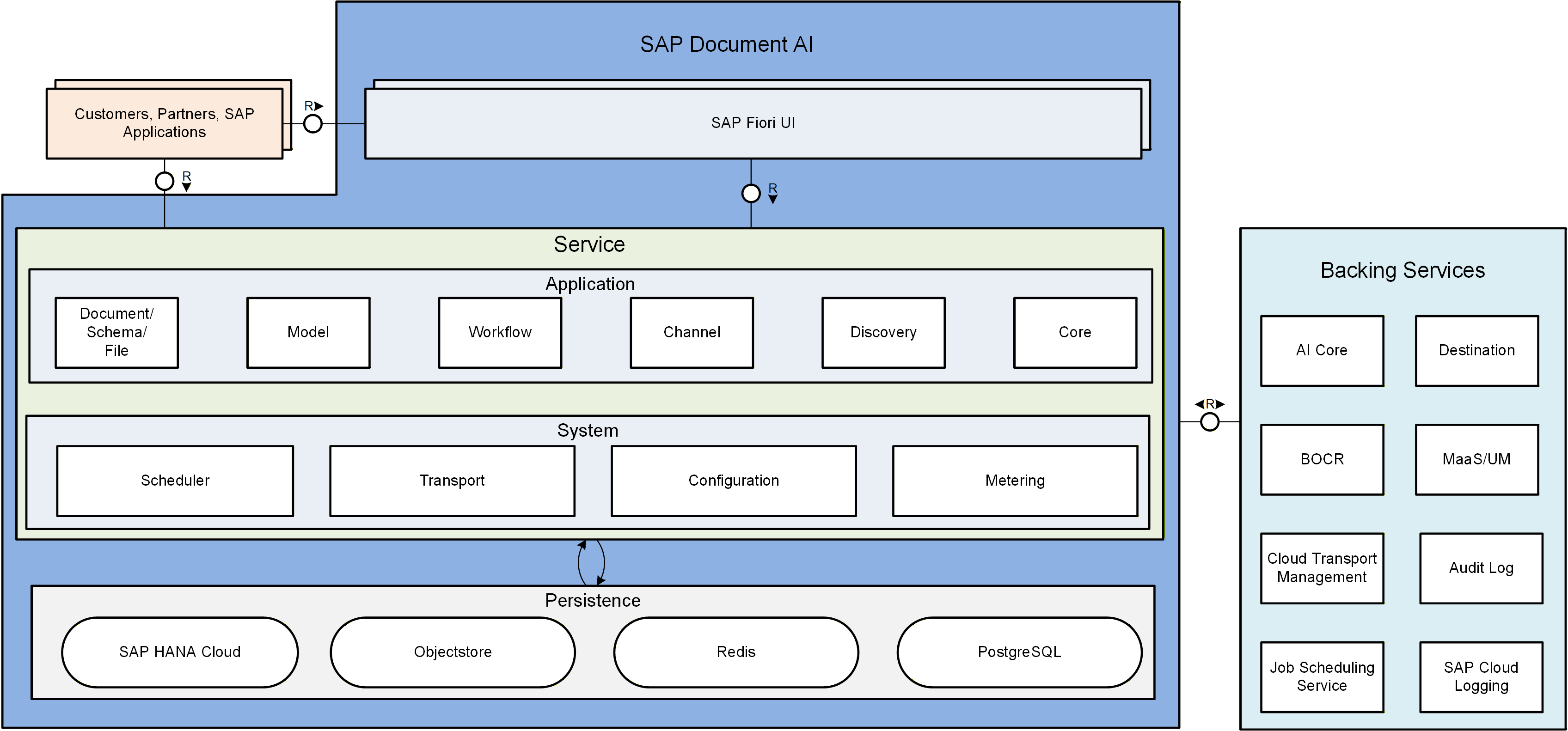
SAP Document AI is a cloud-based service with a microservice architecture. It consists of several components, including:
- File handling
- Schema creation
- Document processing
- Channel management
- Metering
- Model management
- etc.
It uses the CAP Framework and is built on top of SAP Business AI Platform. It can be accessed via REST API and OData APIs and can be integrated into applications using SDKs.
Build and Deploy
When using the service as a PaaS service you can use either Cloud Foundry or kubernetes to deploy your application. A guide how to set up the service can be found here: Initial Setup
When using the service as a SaaS reuse instance, you need to declare SAP Document AI as a dependency to the multitenant application. During onboarding a SAP Document AI tenant will be automatically onboarded. Details can be found here: Run SAP Document AI in Multitenant Application
Run
When using the service via API, you need to have a proper authentication via XSUAA, IAS or certificates.
- XSUAA: Get Access Token
- IAS: Subscribing with Identity Authentication Service
- x509: Enable x.509 Authentication
The REST API definition can be found here: Document Information Extraction API
The latest OData reference can be found in the API Business Hub: Document Information Extraction API v2
SAP Document AI also offers a dedicated UI. The UI is a web-based application which needs to be added as subscription to the SAP Business AI Platform subaccount. After the subscription, you can access the UI via the SAP Business AI Platform launchpad. The UI allows you to upload documents, view extracted data, and manage your SAP Document AI tenant.
The information how to set up the latest Workspace UI which is based on the new OData APIs can be found here: Using SAP Document AI Workspace
SAP Managed Joule Integration
SAP Document AI is part of the SAP Managed Joule. This means that it automatically integrates with SAP Managed Joule and can be used to extract structured data from documents that are uploaded by users. The integration allows you to enhance your business workflows and improve the user experience.
Along with SAP Document AI, Document Grounding is also part of the SAP Managed Joule Work. Document Grounding is a service that allows you to ground documents from various sources, like SharePoint or SAP Advanced Document Management. Document Grounding is managed with the UI of SAP Document AI and can be used to extract structured data from documents that are uploaded by users.
In addition an MCP Server is released via the Agent Gateway which allows to integrate SAP Document AI and Document Grounding into your own applications. The MCP Server contains tools to extract the text from files, structured data and chunks of data from documents. The MCP Server can be called by Agents via the Agent Gateway to use Grounding and Extraction capabilities.
Most Important Links:
Best Practices & Tutorials:
- Use Generative AI to Process Business Documents - Find out how to use the SAP Business AI Platform service SAP Document AI with generative AI to automate the extraction of information from any type of document using large language models (LLMs).
- Use Machine Learning to Process Business Documents - Try out the SAP Document AI Trial UI to process business documents that have content in headers and tables.
- Use Machine Learning to Extract Information from Business Documents and Enrich Data - Process business documents that have content in headers and tables, and enrich the information extracted with your own master data records, using machine learning and Swagger UI.
- Shape Machine Learning to Process Standard Business Documents - Create your own header and line item fields, and edit extraction results for documents associated with templates to automate the extraction of information from standard business documents such as invoices and purchase orders.
- Shape Machine Learning to Process Custom Documents - Create your own header and line item fields, and edit extraction results for documents associated with templates to automate the extraction of information from custom documents (not supported out of the box) such as résumés and power of attorney.